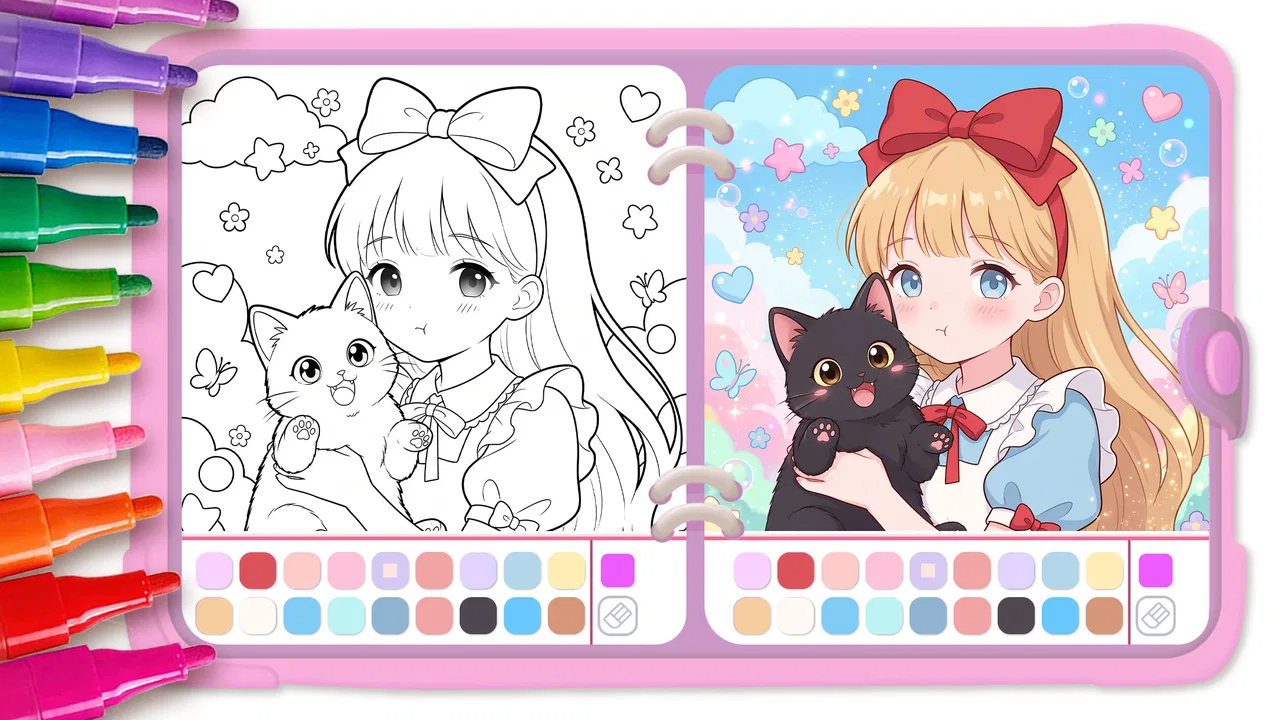
Cute Drawing : Anime Color Fan
- 4.6
- Rating
- 10.00M
- Installs
- Free
- Price
 Analysis by App-foxy
I found Cute Drawing: Anime Color Fan most interesting as a low-pressure coloring game rather than as a serious drawing studio. It is made by JoyCraze, sits in the educational games category, and focuses on cute anime-inspired coloring activities for children and casual players. I could open it for a few minutes or settle into a longer coloring session, which makes it easy to imagine using it during a quiet break, while traveling, or as a simple creative activity for a child.
The basic appeal is clear: choose a picture, add color, and enjoy the visual result without needing drawing experience. That simplicity is also the reason I would recommend approaching it with the right expectations. This is not the best choice for someone seeking professional illustration tools, detailed layer editing, or a replacement for a full digital art app. Its strength is the gentle, approachable experience of filling in charming images.
How the coloring experience feels in everyday use
My first impression was that the game is designed to reduce the intimidation that often comes with drawing apps. You do not need to begin with a blank canvas or decide what to sketch from scratch. A prepared illustration gives you an immediate starting point, so the creative decision is mainly about color and style. For a child who becomes frustrated by drawing recognizable shapes, that can make the activity feel much more achievable.
You May Also Like

 Blood Strike: 2.5 Anniversary
Blood Strike’s Loadouts Turn Every Drop Into a Tactical Gamble
A close look at Blood Strike’s custom loadouts: how fast access to signature weapons reshapes its battle royale rhythm, rewards preparation, and narrows the gap between fights.

 Pandora - Music & Podcasts
Pandora’s Music Is Easy to Start, but Harder to Recover
Pandora’s strength is its low-effort path from a seed to a station. Its weak spot is how much confidence it asks you to place in connection, setup, and quiet recovery.

 8 Ball Pool
 Is Built on Rivalries, Rematches, and Routine
A close look at the rivalries, rematches, shared routines, and unanswered safety questions that turn a quick pool match into a persistent mobile community.

 Samsung Music
’s Quiet Strength Is Playing What You Already Own
Its reach comes less from spectacle than from dependable access to a personal library. That simplicity is both the app’s strongest retention engine and its ceiling.

 AccuWeather: Weather Radar
AccuWeather Review: A Quick, Clear Forecast for Everyday Decisions
For everyday plans, the best forecast is the one you can understand quickly. AccuWeather makes rain timing, radar, and local conditions easy to act on, with a few trade-offs.

 Hill Climb Racing
Why Hill Climb Racing Still Turns Crashes Into One More Run
A tiny car, a bumpy hill and one more upgrade: Hill Climb Racing keeps resurfacing because its simple chaos makes every near-miss feel personal.
More From Our News Desk



The interface is generally easier to understand than a conventional art program because the main task is visually obvious. A player can concentrate on the picture instead of learning a complicated set of tools. That matters for younger users, occasional players, and anyone who prefers direct interaction over menus filled with technical controls.
Navigation is most comfortable when the player treats each image as a short project. I found it useful to look at the entire picture before coloring, decide which areas should share a color, and then work from the larger shapes toward the smaller details. That simple habit prevents the session from becoming a series of random taps and gives the finished image a more deliberate look.
The anime and cute-art direction also gives the game a recognizable identity. The pictures are aimed at people who enjoy expressive characters, playful designs, and decorative coloring rather than realistic landscapes. If that visual style is already appealing to you, the activity feels more personal than a generic paint-by-number exercise.
Readable controls and a gentle learning curve
For a new player, the biggest advantage is that the interaction can be learned by trying it. I would feel comfortable handing the game to a child who understands basic touch controls, then staying nearby for the first session to explain the purpose of the tools and any on-screen prompts. The experience does not demand knowledge of brushes, opacity, layers, or file formats before the player can make progress.
That simplicity supports different levels of confidence. A beginner can select colors conservatively and follow the boundaries of the illustration, while a more imaginative player can experiment with unusual combinations. I especially like that a picture can be treated either as a guided activity or as a chance to make a deliberately unusual palette. The game does not need to be played as if there were one correct artistic answer.
There is a useful distinction between being easy to start and being deeply customizable. The former is where this game performs best. Players who want extensive control over brush behavior, precise color mixing, or sophisticated composition will probably find the experience limited compared with a dedicated drawing application. That is not a flaw for its intended casual role, but it is important when choosing it for an older child or an adult artist.
Motor demands, attention, and sensory comfort
Coloring on a touchscreen can be more physically approachable than drawing with a mouse, but it still requires controlled taps and short movements. Someone with reduced finger precision may find small sections difficult, particularly when a picture contains many narrow spaces. I would begin with larger areas and avoid judging the result too harshly. The point is to make a pleasing image, not to prove perfect hand control.
A practical workaround is to use a larger device when available. More screen space can make small details easier to see and can reduce the need for repeated tapping in exactly the same place. A stylus might also feel more natural for some players, although the experience should be tested with the specific device rather than assumed to work identically for everyone.
For children who tire quickly, I would keep sessions short and finish one manageable section at a time. Coloring can look calm while still requiring sustained visual attention. Breaking the activity into small goals, such as completing the character first and the background later, makes it easier to stop without feeling that the whole picture was abandoned.
Sensory preferences are another consideration. Bright anime artwork and strong color changes may be enjoyable for one player and tiring for another. I would introduce the game in a quiet setting, lower competing distractions around the device, and watch whether the player remains comfortable. The game can support a peaceful routine, but the surrounding environment will have a large effect on that experience.
Using it with children and in shared situations
The Everyone content rating makes the game suitable for a broad audience, but age suitability is not the same as independent suitability for every child. A younger player may still need help understanding navigation, choosing a picture, or handling any purchase-related screen. I would set up the device before handing it over and keep an eye on the session, especially if the child is unfamiliar with mobile games.
It works well as a short after-school activity. For example, a child could spend a few minutes coloring while waiting for dinner, then show a parent the finished character and explain the color choices. That creates a small opportunity for conversation without turning the game into a formal lesson. I would encourage the child to describe why a color was chosen rather than correcting the palette.
It can also be useful during travel, provided the device is comfortable to hold and the player is not relying on a constant internet connection that may be unavailable. I would test the exact travel setup beforehand instead of assuming every part of the experience behaves the same offline. A child who becomes motion-sick from looking at a screen should also use it cautiously in a moving vehicle.
For shared family use, taking turns is more productive than having several people tap at once. One person can choose the image and another can suggest a palette, then the player holding the device makes the final decisions. This turns a solitary coloring task into a light collaborative activity while preserving the player’s sense of ownership.
Creative value beyond simply filling spaces
The educational label makes sense in a broad, informal way. The game can encourage color recognition, visual planning, patience, and the confidence to make choices. I would not treat it as a structured art curriculum, but it can be a friendly starting point for discussing warm and cool colors, contrast, character design, and how a background changes the mood of a picture.
One technique I found helpful was to choose a small palette before beginning. Instead of selecting every color impulsively, I would pick a main color, a supporting color, and one accent. This creates a more coherent image and gives the player a concrete creative challenge. A parent or teacher could turn that into a simple exercise: use only a few colors, then compare the mood with a second version using brighter contrasts.
Another useful approach is to color the same type of subject in two different ways. A cheerful character can receive soft colors in one session and bold, dramatic colors in another. The player learns that the original line art does not dictate one unavoidable result. That is a more meaningful creative lesson than merely trying to match a sample image.
I also recommend leaving some decisions until the end. Coloring the background too early can make it harder to judge the character’s contrast. Completing the central figure first lets the player see whether the surrounding colors support or compete with it. This workflow is simple, but it makes the activity feel closer to design than to repetitive tapping.
Where it sits beside other drawing and coloring apps
Compared with a blank-canvas drawing app, this game is much less demanding at the beginning. A blank canvas offers greater freedom but can leave a beginner unsure where to start. Here, the prepared artwork removes that first obstacle. I would choose this game for relaxation, guided creativity, or a child who needs a clear visual prompt.
Compared with a traditional coloring book on paper, the digital format is cleaner and easier to reset. There is no need to store pages, sharpen pencils, or accept a permanent mistake. That convenience is valuable in a small home or while traveling. Paper still has advantages, though: it offers a different tactile experience, does not depend on a charged device, and may be easier for someone who dislikes bright screens or touch gestures.
Compared with a professional illustration app, the trade-off is obvious. A serious artist will usually want more control over brushes, layers, selection tools, and export options. This game is better understood as a guided coloring playground. Its focused design is an advantage for casual users and a limitation for anyone who wants to build a detailed digital-art workflow.
The free entry price makes it easy to try without committing money first. There are in-app purchases ranging from $1.99 to $6.99 per item, so I would review purchase prompts with a child before allowing independent play. The safest family workflow is to decide in advance whether optional items are allowed and to keep payment control with the adult.
Barriers that may affect the experience
The main barrier is precision. Small areas can be uncomfortable for users with tremors, limited reach, or difficulty maintaining a steady touch. The game’s approachable concept does not automatically remove the physical demands of a touchscreen. If accurate tapping is tiring, a larger screen, a different grip, or shorter sessions may help, but none of these should be treated as a guaranteed solution.
Visual complexity can create a second barrier. Cute character art may contain many details, and a player with low vision or visual fatigue may struggle to distinguish narrow regions. I would test a single picture before deciding whether the game is suitable for regular use. A device with a bright, clear display can improve comfort, while glare or a crowded environment can make the same image harder to follow.
Attention is another variable. The activity is simple, but simplicity does not mean every player will find it engaging. Someone who needs constant novelty, competitive goals, or a strong progression system may lose interest quickly. In that case, a puzzle game, structured art course, or more feature-rich drawing tool could be a better match.
There is also a difference between accessible entry and accessible independence. A child may understand the coloring task but still need an adult to manage device settings, purchases, or transitions away from the game. I would judge the experience on the whole routine rather than only on whether the first picture is easy to color.
Performance, device fit, and practical expectations
The game supports devices running Android 6.0 or later, which covers a wide range of hardware. Even so, compatibility is not the same as comfort. Older phones may offer a smaller display or less responsive touch interaction, and those factors matter more here than raw game complexity. Before choosing it for a child with motor or visual needs, I would try it on the exact device that will be used regularly.
The current version is 1.173, and the game has reached over ten million installs. Its average rating is 4.7 from around fifty-one thousand ratings, with roughly three hundred forty written reviews. Those figures suggest that many players enjoy the concept, but they cannot predict whether the touch demands, visual style, or optional purchases will suit a particular person.
I appreciate that the game is free to start, because coloring is a type of activity that benefits from a quick trial. I would spend enough time with both an easy image and a detailed one before deciding. That reveals more than the first pleasant impression: it shows whether navigation remains comfortable, whether the player can maintain interest, and whether the optional purchase structure becomes distracting.
Who should choose it and who should skip it
I would recommend it to children who enjoy anime-inspired characters, beginners who want a clear starting point, and adults looking for a simple creative break. It is also a reasonable choice for families who want a low-pressure activity that can lead to conversations about color and design without presenting itself as homework.
I would be more cautious for users who need large, highly adjustable controls, have significant difficulty with precise touch input, or become uncomfortable with colorful screen-based activities. I would also skip it for anyone expecting professional drawing tools, advanced editing, or a deep art-learning program. A paper coloring book may be kinder to someone who prefers tactile materials, while a full illustration app will serve an experienced artist better.
For an inclusive routine, I would start with a short session, choose a picture with broad areas, and let the player decide whether to continue. I would keep the device on a stable surface if holding it is tiring, use a larger screen when possible, and separate creative guidance from correction. The player should be allowed to make unconventional choices; independence is part of the benefit.
After using it as a casual coloring game, my view is positive but specific. Its strongest quality is the welcoming path from opening the game to making something recognizable. It lowers the blank-page problem, encourages experimentation, and works for a wide age range without demanding artistic confidence.
Its limitations are equally clear: touchscreen precision, visual detail, and purchase management can still create friction, and the simple format will not satisfy users who want a complete art studio. With those boundaries in mind, I think Cute Drawing: Anime Color Fan is worth trying for relaxed, guided creativity. I would choose it for a child’s short coloring session or my own quick visual break, while selecting paper or a more advanced drawing tool when physical comfort, tactile feedback, or detailed control matters more.
FAQs for Cute Drawing : Anime Color Fan
01What is Cute Drawing: Anime Color Fan?
Cute Drawing: Anime Color Fan is a mobile app designed for anime enthusiasts who love to draw and color. It provides a wide range of anime-themed templates and tools to help users create vibrant illustrations. The app is perfect for both beginners and experienced artists who want to explore their creativity in anime art.
02Is Cute Drawing: Anime Color Fan free to use?
The app is free to download and offers a variety of free features and templates. However, it also includes in-app purchases that provide access to additional tools, premium templates, and an ad-free experience. Users can choose to enjoy the basic features or enhance their experience with these premium options.
03What devices are compatible with Cute Drawing: Anime Color Fan?
Cute Drawing: Anime Color Fan is available for both Android and iOS devices. It is optimized to run smoothly on most smartphones and tablets. To ensure the best performance, it is recommended to use the app on devices running the latest version of Android or iOS.
04Does the app require an internet connection?
An internet connection is not necessary for using the basic coloring and drawing features of Cute Drawing: Anime Color Fan. However, access to certain features, such as downloading new templates or accessing premium content, requires an internet connection. For uninterrupted use, it's best to have a stable connection.
05Can I share my artwork from Cute Drawing: Anime Color Fan?
Yes, the app allows you to easily share your creations with friends and on social media platforms. Once you've completed a drawing, you can export it in various formats and directly share it on platforms like Instagram, Facebook, or via messaging apps, showcasing your artistic skills to your audience.
Pros
- User-friendly interface for beginners.
- Wide range of anime templates available.
- Regular updates with new content.
- Offline mode for drawing anywhere.
- High-quality coloring tools included.
Cons
- Limited free features without subscription.
- Occasional app crashes on older devices.
- Ads can be intrusive during use.
- No advanced editing tools available.
- Limited storage for saved drawings.

Cute Drawing : Anime Color Fan
Gallery